Éditions Phil Portugal

Création d’univers narratifs immersifs

Tag: Games

  • Starbugs Wars: Fly Fighter Mission

    Starbugs Wars: Fly Fighter Mission

    Starbugs Wars: Fly Fighter Mission


    Concept, graphisme, programmation et musique du jeu: Phil Portugal

    Get the game music on: Spotify | Apple Music | Youtube Music

    In a distant galaxy ruled by insects, you are the last hope of the Fly Fighter squadron. Strap into your bug-shaped starship and blast off into an action-packed arcade adventure filled with asteroid fields, enemy ships, and explosive synth music.

    Mission 1: Asteroid Escape
    Your journey begins in the treacherous Zeta-22 asteroid belt. You have just two minutes to pilot your Fly Fighter through an endless field of tumbling space rocks. Dodge, weave, and shoot your way forward in a frantic race against time. With every twist and turn, survival becomes harder as asteroids get faster and denser.

    But you’re not defenseless. Use your twin plasma stingers to blast through debris and open a path. Grab floating power-ups to extend your life, slow down time, or activate your ship’s ultimate weapon: the Disintegration Bomb, which clears the entire screen in one devastating pulse. Stay alert, time your moves, and prove your reflexes in this intense opening level.

    Mission 2: Spider Jet Showdown
    After escaping the asteroid field, a new threat emerges: the deadly Spider Jets. These sleek, venomous enemies are the sworn rivals of the Fly Fighters, and they’re coming in force. Fly into hostile space, face wave after wave of coordinated attacks, and fight for your survival.

    Each Spider Jet formation brings new patterns and surprises. Dodge homing stingers, unleash your charged shots, and master the timing of your Disintegration Bomb to wipe out full squadrons. Midway through, the enemy launches Spider Swarm Mode — a screen-filling onslaught that will push your skills to the limit. Only the best pilots will survive and make it to the hidden Fly Base, a glowing sanctuary deep in the galactic shadows.

    Retro Style, Modern Thrills
    Starbugs Wars blends the fast-paced excitement of classic arcade shooters with a unique insect-inspired sci-fi universe. Navigate through organic ships and neon-lit backgrounds while a pulsing synthwave soundtrack drives the action. From pixel-perfect dodging to all-out space combat, every moment delivers fun, challenge, and nostalgia.

    Whether you’re a fan of retro space shooters or just looking for a new arcade obsession, Starbugs Wars: Fly Fighter Mission offers adrenaline, creativity, and pure old-school fun in every mission.

    Are you bug enough to survive the swarm? Jump in, power up, and buzz through the galaxy today.


  • Lucky Draw Tool

    Lucky Draw Tool

    Lucky Draw Tool


    Comprehensive Tool for Your Drawing Needs

    • Letters: Choose the full alphabet, consonants, or vowels. This is very useful for all your word games like Scrabble, etc.
    • Numbers: Select the maximum number you want, up to 9999 (option to exclude ‘0’). This can be used for lottery draws, bingo, or other number games. Plus, you can track previous draws—perfect for games like Lotto or Bingo.
    • Heads or Tails: Coin flip.
    • Custom Elements: Save your own elements! Names, colors, fruits, tasks, emojis, etc., and draw from your custom list. Perfect for deciding who goes first, what to eat, what to do next, or which movie to watch. Your elements are saved on your device and can be reused.

    During your games, you can track previous draws and flips.

    How to use Lucky Draw Tool

    1. Select the type of draw you want: letters, numbers, or custom entries.

    lucky draw sceenshot v2 02

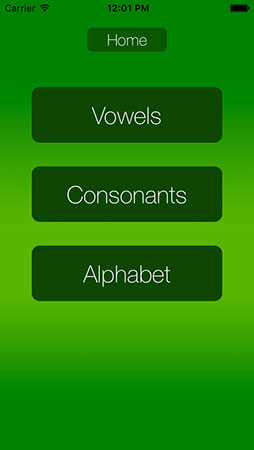
    2. For letters, you can choose vowels only, consonants only, or the entire alphabet.

    lucky draw screenshot 2

    3. For numbers, adjust the maximum number using the picker. This maximum cannot exceed 9999. You can choose to exclude 0 from the draw (e.g., for the lottery, numbers range from 1 to 49). The draw will take place between 1 and your maximum number. The “Draw” button will only appear if you have at least 2 potential numbers.

    lucky draw sceenshot v2 01

    4. For custom entries, tap on “+” and enter the items you want (names, movies, tasks, colors, etc.). You can delete an entry by swiping it off the list. All your custom entries will remain on your device until you delete them or uninstall the app.

    lucky draw screenshot 6
    lucky draw screenshot 5
    lucky draw screenshot 9

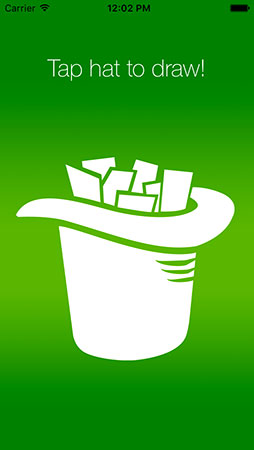
    5. When you click “Draw,” all the elements are placed into the hat (letters, numbers, or custom list). Tap on the hat to pick a paper. The result will be displayed automatically.

    lucky draw screenshot 4
    lucky draw screenshot 7

    6. After multiple draws, by clicking “Previous draws,” you can access a list of all previously drawn items. Clicking “Clear All” will reset the draw and take you back to the home view.

    lucky draw screenshot 8

    7. To flip a coin, select “Coin“. Then click on the hand. The coin will land heads or tails. Each flip is temporarily saved, and you can access the results by clicking “Previous flips